
The Device LAN (optional) feature allows ei³ SERVICE admin users to create custom network routes for their Red Box Amphion devices. This feature is accessed under Admin → Edit Machine and is used to define special network paths that allow the Amphion to reach devices on different subnets than the main Machine LAN. It does this by routing traffic through other devices on the machine.
When to Use Device LANs
Use Device LANs when your machine includes devices with IP addresses in a different subnet than the main network, and you need to access them for remote service or data collection.
By setting up a Device LAN, you’re telling the Red Box Amphion how to reach those other networks—using a device that is already connected to the Machine LAN as a gateway.
Device LAN entries are stored in the machine configuration and applied during configuration deployment to the Amphion. For full deployment instructions, see: Amphion Configuration Instructions
To define multiple routes with different gateway devices:
- From the Device LAN (Optional) section, choose the Custom template.
- In some cases, there will be a template of common configurations of the LAN provided in the drop-down list, that can be selected.
- When selected, this will auto-fill the table with the settings for that selected configuration.
- Use the add icon (green plus sign) to insert new rows.
- The following network information must be entered for each row:
- Subnet ID
- Gateway
- Subnet Mask
- Gateways must be within the Machine LAN or Shop Floor LAN ranges.
Important: Gateways must be on the same network as the Machine LAN or Shop Floor LAN.
Do not use the IP address of the Amphion itself as a gateway—this must be a different device that can forward packets to the desired subnet.
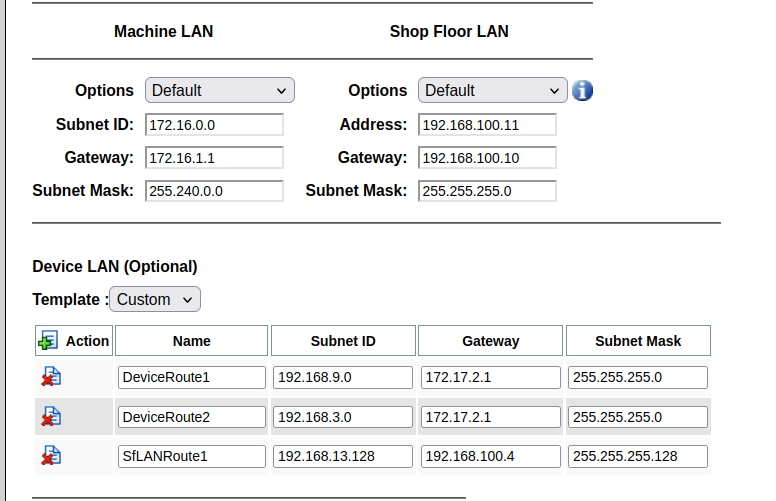
Example
In the example shown above, the Red Box Amphion S14 is configured to communicate with devices on three additional networks:
- 192.168.9.0/24 and 192.168.3.0/24 via gateway 172.17.2.1
- 192.168.13.128/25 via gateway 192.168.100.4
If a gateway device is offline or unreachable, all devices behind that gateway will also be unreachable.
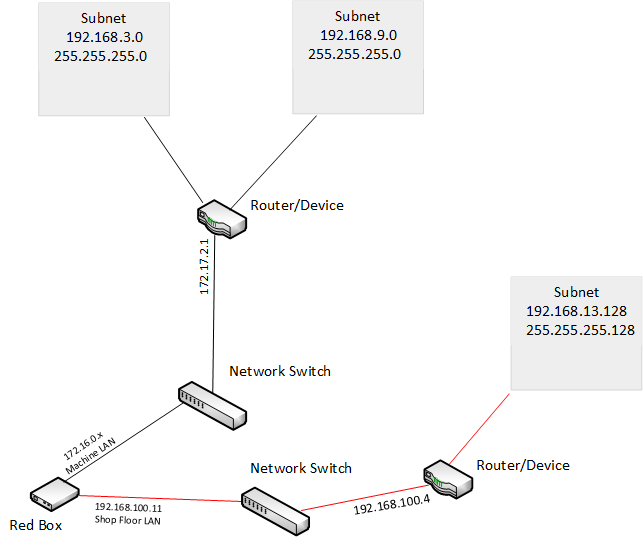
Here is a network diagram of the setup entered above.
Limitations
- Pre-A14 Amphion Devices: Older Amphion models prior to the A14 do not support this feature. The Device LAN custom configuration option will not appear for these models.
- Custom Dual-IP on “to Machine” Interface: If your setup requires the Red Box to host two IP addresses on the same interface (e.g., 172.16.0.0/24 and 192.168.3.0/24) to reach both networks, this is a custom configuration. Please contact care@ei3.com with your Project Number and the second IP address you’d like the Red Box to use.
